


TrayMinder
4.0234.00 Reviews
App Specs
- Version
- 14.3.4
- Updated On
- License
- Free
- Downloads
- 100,000+
- Developer
- TrayMinder LLC
- Categories
- Medical
- Platform
- Android
Screenshots
 Analysis by AppCompare
When someone recommends a medication reminder, I first want to know whether it can keep pace with a real routine rather than simply send a notification. TrayMinder is a free medical app from TrayMinder LLC, and its focus is supporting people who use clear aligners. That focus matters: changing trays and remembering wear routines are different from managing a general list of pills, so I’d judge it by whether it helps make those habits easier to follow.
I’d treat it as a practical companion, not as a substitute for instructions from an orthodontist or other clinician. An app can help me remember a routine, but it cannot decide when I should change a tray or tell me how to handle discomfort. For those decisions, my care team’s guidance comes first.
A useful starting point for an aligner routine
The simplest way to get value from TrayMinder is to connect its reminders to actions I already take. Rather than setting an alert at a random time, I’d choose moments that fit my day, such as after breakfast or before getting ready for bed. A reminder is easier to act on when I’m near the place where I keep my aligner case and can follow through immediately.
That small setup choice can prevent a common failure: dismissing a notification because I’m busy, then forgetting why it appeared. If my schedule changes, I’d review the routine rather than assume a reminder that worked last week still fits. The app can prompt me, but a prompt only helps when its timing makes sense in my life.
Settings and habits worth checking
TrayMinder’s value depends on setting reminders around the instructions I have actually been given. I wouldn’t copy a schedule from a friend or choose a tray-change pattern because it seems convenient. If my orthodontist gives me a specific plan, I’d use that as the reference point and keep any app entries consistent with it.
I’d also decide what I want a reminder to do before making the schedule complicated. A short, recognizable cue is often more useful than a long note I won’t read while rushing. For example, I might use a brief prompt for a routine check and reserve extra detail for a reminder where context genuinely helps. The aim is a cue I can understand at a glance, not a stream of notifications I eventually ignore.
TrayMinder is rated for Everyone, but that doesn’t mean every setup choice suits every person. Someone helping a teenager or an older relative may need to agree together on who responds to reminders and how the routine is checked. Clear expectations can be more important than adding more alerts, especially when the app is supporting a care plan shared with another person.
Worth Reading Before You Choose

EA SPORTS FC Mobile 26 Is a Bigger Football Game, but It Takes Time

Flipboard Shows What News Apps Must Do Beyond the Feed

Switching to Android Auto Means Rethinking Your Driving Routine

Google Calendar Makes a Crowded Week Easier to Manage

Ludo King Makes the Most of the Minutes Between Plans

Baby Panda World Brings Quick Play to Modern Phones, but Its Game Library Feels Busy
How I’d make the routine easier to keep
For a repeatable routine, I’d pair reminders with a physical habit: keep the case in a familiar place, then deal with the aligner before moving on to the next task. That makes the notification a starting signal rather than the whole system. If I’m away from home, I’d think ahead about where I can safely handle the case instead of relying on memory at the last minute.
Travel needs a little extra attention. Time-zone changes can affect when a reminder appears, so I’d check the schedule after arriving and make sure it still lines up with the plan I’m following. I wouldn’t assume an automatic adjustment has resolved every practical detail, especially if I’m crossing time zones during a busy day. A quick review can prevent a reminder from landing at an awkward moment.
Where it fits—and where it doesn’t
The app’s clearest audience is people who already wear aligners and want help staying consistent. Its medical category and focused purpose make it more relevant to that group than a general calendar, where a tray-related prompt can disappear among appointments and errands. A calendar may still be enough for someone who only needs an occasional alert, while TrayMinder makes more sense when the aligner routine is something I want to keep visible and repeatable.
It is less suitable for someone seeking a full medical record, clinical advice, or a way to manage every aspect of treatment. I’d also skip it if reminders tend to increase my stress or if I know I won’t maintain another app. In those cases, a simpler cue—such as a regular point in the day or a note where I keep my case—may be easier to sustain. The best system is the one I actually use.
TrayMinder has an average rating of 4.5 from around 2.4 thousand ratings, and it has been installed over 100 thousand times. Those figures suggest that many people have tried it, but they don’t guarantee that its reminder style will match my habits. I’d use the free app as a chance to see whether its focused approach helps before considering any optional in-app purchases, which range from around two dollars to about seventy dollars per item.
Getting Started with TrayMinder
First things first, downloading TrayMinder is a breeze. It's available on both Android and iOS, so head over to your respective app store and grab it. Once installed, the setup process is super simple. The app guides you through entering your medication details, including dosage, frequency, and the time you need those friendly reminders.
The interface is clean and intuitive, which is always a plus in my book. I didn’t feel overwhelmed by unnecessary features. Everything is laid out in a way that makes sense, even if you’re not particularly tech-savvy.
Features That Stand Out
One feature I absolutely love is the customizable reminders. You can set them to be as persistent as you want. If you’re someone who needs a little nudge, you can even add notes to each reminder. Imagine getting a reminder saying, "Hey, don’t forget to take that pill with food!" It’s those little touches that make a big difference.
Another standout feature is the medication history log. This is a lifesaver if you need to check when you last took your meds. If you’re managing multiple medications, this feature is invaluable. You can easily track your adherence and even share this data with your healthcare provider if needed.
Daily Life with TrayMinder
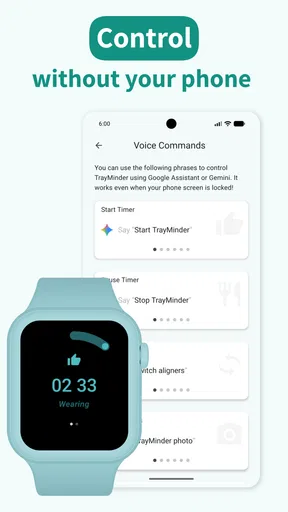
Using TrayMinder day-to-day is straightforward. The app sends you notifications based on your schedule. I found the notifications to be timely and non-intrusive. They come through even if your phone is on silent, which is perfect for those busy days when your mind is elsewhere.
For those of us who travel often or have irregular schedules, TrayMinder has a time zone adjustment feature. This means if you’re jet-setting across the globe, your medication reminders adjust accordingly. It’s a small detail, but it’s incredibly thoughtful.
Why You’ll Love It
If consistency with medication is something you struggle with, TrayMinder can become your new best friend. It’s designed to fit seamlessly into your life without causing any additional hassle. Plus, it’s not just about taking your meds on time; it’s about taking them correctly, and that’s where the app really shines.
One thing that sets TrayMinder apart is its focus on user feedback. The developers seem to genuinely care about making improvements based on what users want. This commitment to continuous improvement is something I appreciate in any app.
Final Thoughts
All in all, TrayMinder is a robust and reliable app for anyone who needs a little help managing their medications. Whether you’re a forgetful soul or just someone who wants to ensure they’re on top of their health game, this app is worth checking out.
In a world where technology can sometimes feel overwhelming, TrayMinder simplifies things, and that’s a win in my book. So, give it a try and take the stress out of your medication routine. You might just find it’s exactly what you needed.
Making reminders work on an ordinary day
Consider a weekday when I leave home early, get pulled into work, and return later than planned. A useful routine starts before the day gets hectic: I’d check that the reminders reflect the schedule I’m meant to follow, keep my case somewhere I can reach it, and respond to the prompt as soon as I’m able. If I dismiss it while in a meeting, I’d make a deliberate plan to return to the task rather than count the alert itself as proof that I followed through.
This is where a history log can be more useful than memory alone. If I’m unsure whether I already handled a step, checking the record can help me avoid guessing. I’d still be careful about how I interpret it: a log records what I enter or mark, not a clinical assessment of whether my treatment is on track. If a missed step raises a treatment question, I’d ask my orthodontist instead of improvising based on the app.
Faster patterns without overengineering
Experienced users often get more from a reminder app by keeping the routine predictable, not by adding a prompt for every possibility. I’d group the habit around a few dependable moments and make any notes brief enough to scan. When a schedule changes temporarily, I’d review the reminders again once ordinary life resumes; otherwise, a temporary adjustment can quietly become the new routine.
There’s also a useful distinction between a reminder and a record. A reminder helps me notice that it is time to act; a history entry helps me look back at what I recorded. I wouldn’t use one as a replacement for the other. If I tend to tap through notifications automatically, I’d slow down long enough to confirm the action before marking it complete. That extra pause is small, but it makes the record more trustworthy to me.
For a household routine, agreeing on one person’s role can prevent duplicate nudges or confusion. If someone else helps me remember, I’d make the arrangement explicit: who checks the reminder, who handles the aligner, and when we’ll ask the clinician if the schedule is unclear. This is more reliable than assuming a shared phone or a visible alert automatically creates shared responsibility.
Limits to keep in mind
TrayMinder is a focused tool, and that focus is both its strength and its boundary. Someone who wants one place to manage unrelated prescriptions, appointments, and broader health records may prefer a general medication manager or calendar. Conversely, a calendar entry can be easy to overlook when it competes with everything else, so an aligner-specific routine may be a better fit when consistency is the main challenge.
I’d also avoid expecting reminders to overcome every real-world obstacle. A dead phone, a changed work shift, or a notification arriving when I cannot act can interrupt even a well-planned routine. The practical response is to build a simple backup habit—such as checking the schedule at a regular point in the day—rather than adding so many alerts that they become background noise.
The app is free to download, but it offers in-app purchases, so I’d check what an optional purchase includes before spending. I wouldn’t assume a paid item is necessary for the core habit I’m trying to build. The current version is 14.1.0, and TrayMinder was released on October 13, 2018; those details give a sense of its history and present iteration, but my decision would still come down to whether the current workflow suits me.
Who is likely to get the most from it
I’d recommend giving TrayMinder a try if I use clear aligners, already have a treatment schedule from my provider, and want a dedicated nudge to make the routine easier to remember. It is especially appealing when I benefit from seeing a record rather than relying on recollection, or when travel and changing daily plans make a fixed habit harder to maintain.
I’d be more cautious if I want the app to choose a treatment schedule, interpret symptoms, or replace conversations with a professional. It is also not the right tool if I’m looking for a comprehensive medication organizer for a complicated mix of unrelated medicines. Matching the app to the job matters: a focused aligner companion can be clearer than a broad tool, but only if aligner consistency is actually the problem I need to solve.
A considered recommendation
My strongest advice is to begin with the routine I have been told to follow, then add only the reminders and notes that make it easier to carry out. After using that setup through a normal day and a disrupted one, I’d decide whether the prompts are genuinely helping or simply adding another notification to clear. That short, honest check is more useful than assuming a feature list will fit every person.
For aligner users who want structure without turning treatment into a complicated tracking project, TrayMinder is a sensible option. I like the idea of pairing a focused reminder with a history I can consult, while keeping clinical decisions with the professional responsible for my care. It won’t remove the need for attention or a workable routine, but it can make the routine easier to remember—and that is a worthwhile job for an app to do.
Pros
- Intuitive interface simplifies tray tracking.
- Customizable reminders for daily use.
- Syncs data seamlessly across devices.
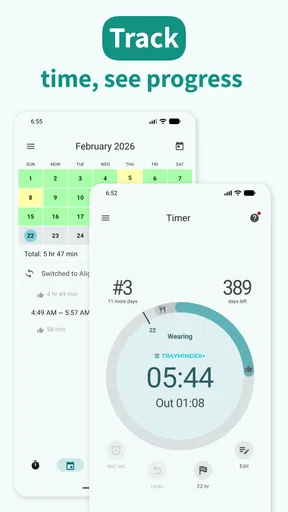
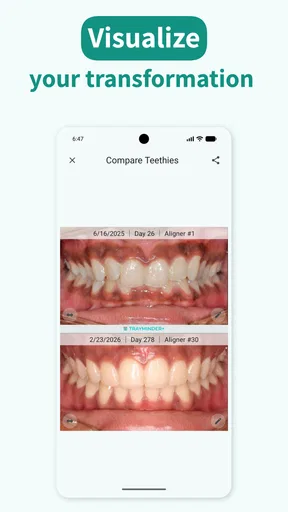
- Offers detailed progress tracking visuals.
- User community for shared tips and support.
Cons
- Limited features in free version.
- Occasional sync delays reported.
- No offline access available.
- Ads can be intrusive for some users.
- Lacks integration with some dental apps.
FAQs for TrayMinder
What is TrayMinder and how does it work?
TrayMinder is a mobile app designed to help users manage and track their orthodontic aligner treatment. It provides reminders for changing aligners, tracks wear time, and offers tips for optimal results. The app syncs seamlessly with your treatment schedule, ensuring you stay on track and achieve the best outcomes.
Is TrayMinder compatible with all types of aligners?
Yes, TrayMinder is designed to be compatible with most brands and types of orthodontic aligners. Whether you're using Invisalign, ClearCorrect, or another aligner brand, the app offers customizable settings to match your specific treatment plan and reminders tailored to your aligner schedule.
Can I customize the reminders in TrayMinder?
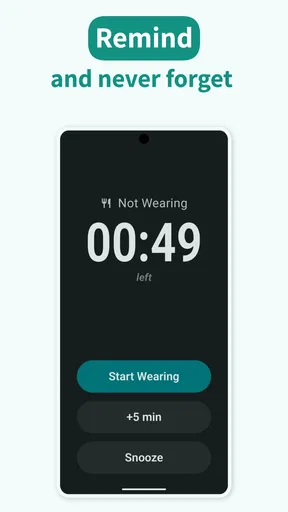
Absolutely! TrayMinder allows you to fully customize your reminder settings. You can set specific times for reminders to change your aligners, as well as notifications for when to wear or remove them. This personalized feature helps ensure you adhere to your treatment plan efficiently.
Does TrayMinder offer any additional features besides reminders?
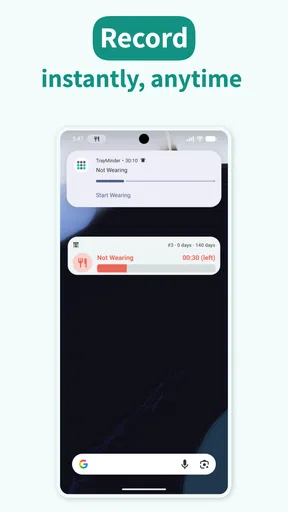
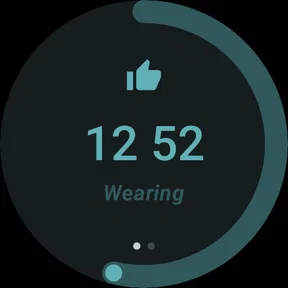
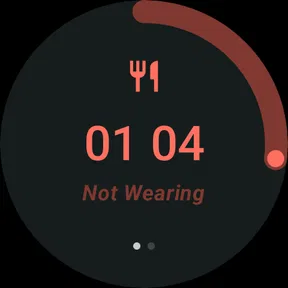
Yes, in addition to reminder notifications, TrayMinder provides several helpful features. These include a daily wear timer, progress tracking, and treatment history. The app also offers tips and advice to maximize the effectiveness of your aligner treatment, making it a comprehensive tool for aligner users.
Is TrayMinder available for both Android and iOS devices?
TrayMinder is available for download on both Android and iOS platforms. It can be found on the Google Play Store for Android users and the Apple App Store for iOS users. The app ensures a smooth experience across devices, offering the same functionality and features regardless of your operating system.


